Using Siemens Technology Objects (TO) to control third-party drives like Rexroth provides a robust and flexible, common in high-end European machinery. Below is the optimized integration workflow.
I. Hardware Configuration & Synchronization
- GSDML Integration: Import the Rexroth GSDML file into TIA Portal to establish the PROFINET node.
- Isochronous Mode (IRT): For high-performance motion control, ensure the PROFINET network and the Drive/PLC cycle are synchronized via IRT to minimize jitter.
II. Communication via PROFIdrive Telegrams
The system relies on the PROFIdrive standard.
- If the Rexroth drive supports standard telegrams (e.g., Tel 1, 3, 5, 105), the integration is straightforward.
- If custom mapping is required, use the Data connection via Data Block method.
III. Data Connection via Data Block (The “Actor/Sensor” Interface)
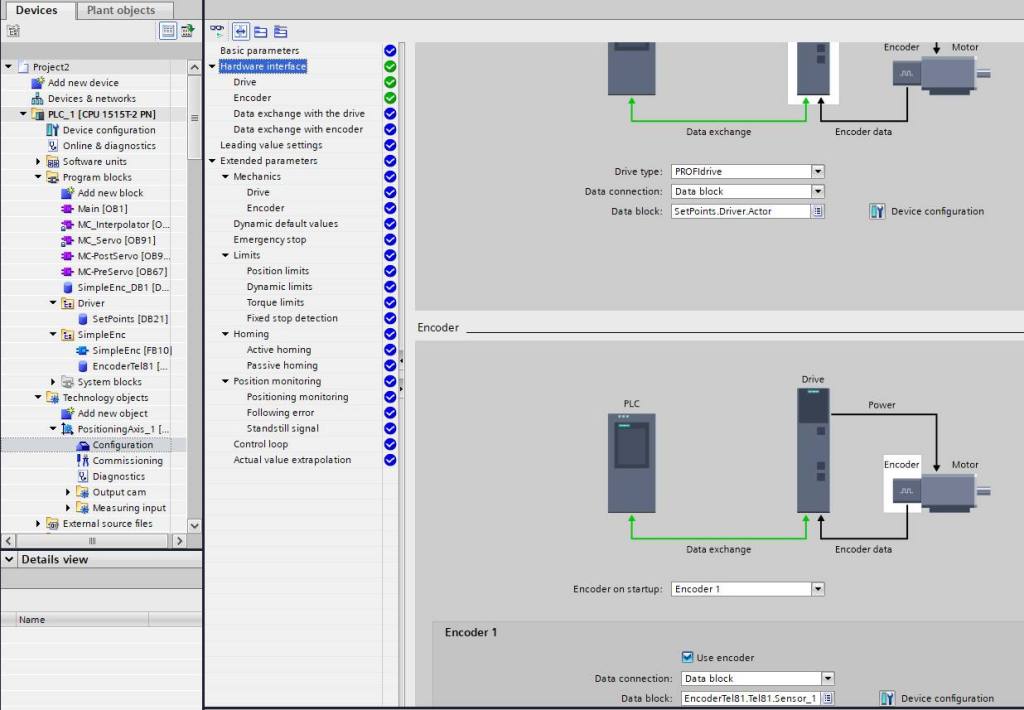
As shown in your configuration screenshot, this method decouples the TO from the physical I/O:
- Interface DB: Create a Global Data Block using Siemens system data types (e.g.,
PD_TEL1,PD_TEL3). - TO Hardware Interface: Set the “Data connection” type to “Data block”.
- Mapping:
- Link the Actor (Drive output) to the SetPoint structure in your DB.
- Link the Sensor (Encoder input) to the ActualValue structure in your DB.
- Data Exchange: Use a communication block (often within the Isochronous OB) to copy the raw PROFINET I/O data from the Rexroth drive into the designated Data Block.
The Siemens TO acts as a “Driver Layer.” By standardizing the interface through a Data Block, the motion control logic remains independent of the hardware brand. This allows engineers to combine the best of both worlds: Siemens’ powerful motion control system and Rexroth’s high-performance drive units.
 法藍克機電 Frank Mechatronics
Leave a comment