In the era of AI, transcribing meeting audio into text is easier than ever. However, when dealing with highly confidential business meetings or working in offline environments, relying on cloud-based APIs (like OpenAI’s Whisper API) raises severe data privacy concerns and incurs ongoing costs.
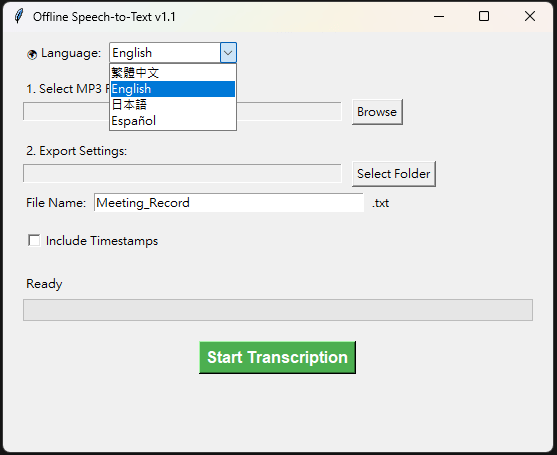
To solve this, I developed a fully offline, multilingual Speech-to-Text Windows application with a user-friendly GUI. In this post, I will share the use cases, technical architecture, and key advantages of this tool.
Application Scenarios
- Confidential Corporate Meetings: Board meetings, financial reviews, or R&D discussions. Audio files are never uploaded to the cloud, ensuring maximum data security.
- Offline Field Research: Journalists, researchers, or social workers operating in remote areas without internet access can instantly transcribe their field interviews.
- Multilingual Interviews: Seamlessly handles transcriptions for international meetings without the need to switch between different translation software.
- Personal Dictation: Content creators and writers can quickly convert spoken ideas into text without paying any subscription fees.
Technical Architecture & Models
This project focuses on being lightweight, efficient, and easy to deploy:
- Programming Language: Python
- Core AI Model:
faster-whisper. This is a reimplementation of OpenAI’s Whisper model using CTranslate2. It significantly reduces memory usage and performs much faster on CPUs compared to the original version. This project utilizes thesmallmodel, striking a perfect balance between processing speed and high accuracy (especially in noisy environments). - Graphical User Interface (GUI): Built with
TkinterandThreadingto ensure the application remains responsive during heavy AI computations. - State Management: Uses local
jsonconfiguration files to remember user preferences. - Packaging Tool: Packaged using
PyInstallerinto a standalone.exefile. The AI model is stored in an adjacent local directory, enabling true offline, portable execution.
Key Features
- Smart Multilingual Support: Both the UI and the transcription engine natively support Traditional Chinese, English, Japanese, and Spanish. Switching the language dynamically updates the AI “Prompt,” significantly improving transcription accuracy.
- Timestamped Exports: Users can choose to output plain text or include millisecond-accurate timestamps (e.g.,
[00:01.000 -> 00:05.000]), making audio proofreading a breeze. - Intuitive Progress Bar: By comparing the total MP3 duration with the AI’s processing progress, the app provides real-time visual feedback.
- Smart Memory: The application automatically remembers the last used input and output directories, streamlining the daily workflow.
Advantages
- Ultimate Data Privacy: 100% local processing. Your audio and transcripts never leave your hard drive.
- Zero Operating Costs: No subscriptions, no per-minute API fees. Install it once and use it forever for free.
- High Noise Robustness: Thanks to the robust architecture of the Whisper model, it handles meeting room echoes, background noise, and varying accents with exceptional accuracy.
If you want to test this app, please feel free to leave a message and contact me!
 法藍克機電 Frank Mechatronics
Leave a comment